ONSONG CHARTS AVAILABLE NOW! LEARN MORE HERE


User Manual
Songs
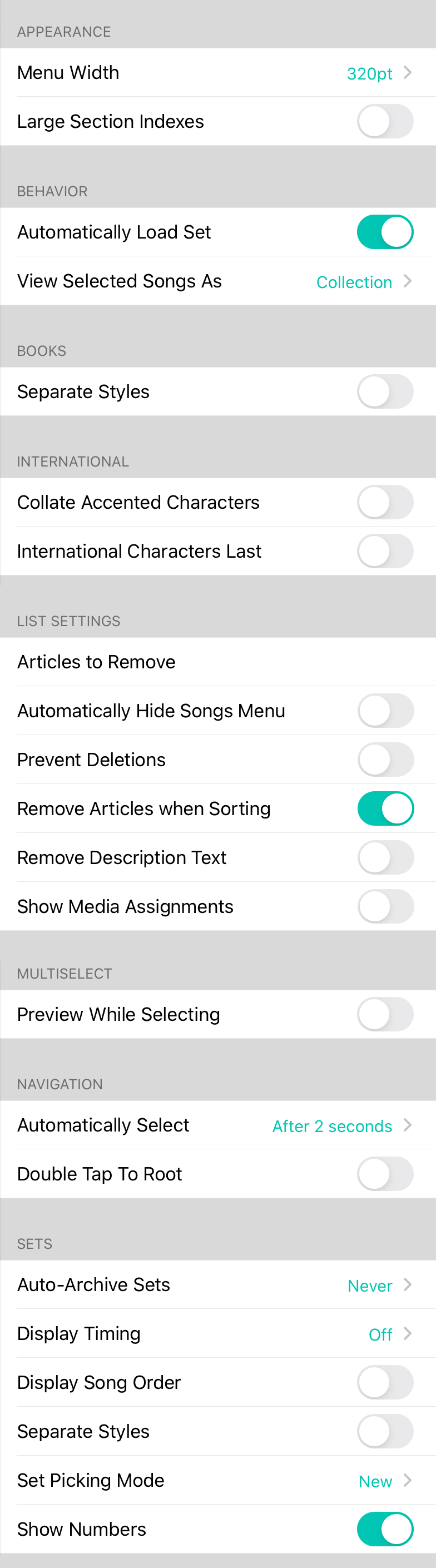
Th' songs menu settin's be used t' change th' appearance an' function o' th' Songs Menu, savvy? It be havin' th' followin' settin's:
Appearance
Th' songs menu be typically 320 points wide, which be th' standard popover width, matey. Turnin' this feature on allows th' menu t' appear at 600 points wide, or roughly twice th' width, Arrr! This allows more content t' be displayed. Default be off.
In addition t' changin' th' width o' th' songs menu, other menus in OnSong will also become wider such as those in th' Song Editor.
Books
This section contains general settin's that apply t' books, ye scallywag.
- Separate Styles configures th' default behavior o' books. When turned on, songs added t' a books retain their preferences an' settin's specific t' th' book. For instance, ye can set th' key o' a song in a book when playin' with a specific vocalist an' not effect th' key o' th' song in yer master library or other books.
International
Th' followin' options change how OnSong sorts content for other languages, Ahoy!
- Collate Accented Characters replaces th' collation algorithm when sortin' results in lists t' place accented characters alongside non-accented characters. This be enabled by default for non-English languages an' can be turned off if there be a perceived performance issues on large libraries.
- International Characters Last will place any songs that begin with an international character such as Ü or Å t' be placed last in th' list o' songs. If turned off, th' songs be sorted next t' their non-accented cousins. Default be off.
List Settin's
Th' followin' options be available for changin' th' way songs be listed, matey.
- Automatically Hide Songs Menu be used t' hide th' songs menu as soon as a song or set has been selected.
- Prevent Deletions be used t' prevent users from accidentally deletin' songs from their list. This removes th' slide t' delete method an' requires ye t' tap on th' Edit button t' perform a deletion.
- Remove "Th'" be used t' sort songs that start with th' word "Th' " usin' th' next word in their name. For instance, "Th' Reckonin'" would be placed next t' "Return t' Narnia" in a song list.
- Remove Description Text will omit th' second line o' each row that contains th' artist name an' key.
Multiselect
This section allows ye t' configure how th' multiselect feature works in th' songs menu, savvy?
- **Preview While Selectin'" determines if ye can view songs while selectin' them t' perform actions.
Navigation
This section contains settin's that effect how th' songs menu tabs behave, Blimey!
- Double Tap T' Root will reenable an iOS feature that has caused confusion for some users. With this enabled, tappin' on a tab when it be already active will display th' first page o' th' navigation control. This default behavior has been changed in OnSong t' avoid confusion. Turn this option on t' reestablish th' default iOS behavior if desired.
Remote Songs
Th' songs menu can be used t' display not only song content in yer local OnSong library, but also cloud-based content, Arrr! Ye can configure th' repository t' use for accessin' cloud content here. Options include:
- Off no cloud repository be used an' th' local/remote toggle be removed.
- RWTC uses th' Rockin' With Th' Cross chord chart repository.
Sets
Th' sets section be used t' change how th' Me Sets tab o' th' Songs Menu operates, matey. Options include:
- Auto-Archive Sets allows sets t' automatically be moved t' th' Archived tab. This reduces clutter an' improves performance. Th' first time that archivable sets be encountered in th' tab, ye be asked what preferences t' use. Ye can change this t' one o' th' listed time frames from 1 day t' 3 months.
- Display Song Order be used t' place a number next t' th' songs in a set. Default be off.
- Separate Styles configures th' default behavior o' sets. When turned on, songs added t' a set save their preferences an' settin's t' th' set. For instance, ye can transpose a song within a set an' not effect th' key o' th' song in yer master library.
OnSong 1.999 — Last Updated on August 13, 2018


