ONSONG CHARTS AVAILABLE NOW! LEARN MORE HERE


Read The Bleepin’ Manual
Bop Bops
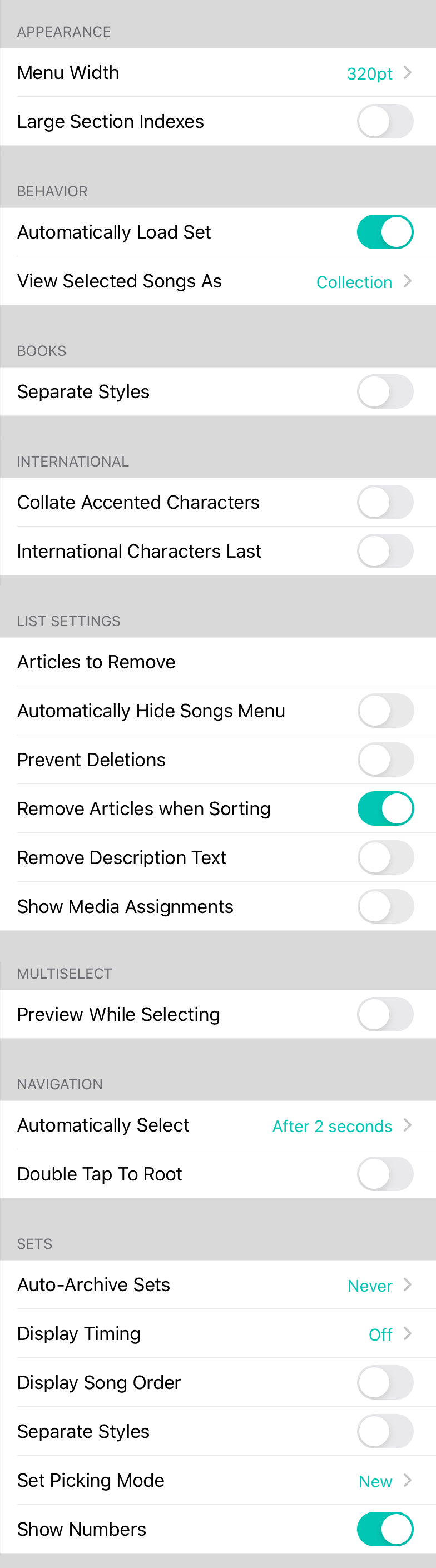
The bleepin' Tunes Menu Settings page—basically where you go to make your Songz Hamburger look & act less like a hot mess. Buckle up, peeps. Here's what you can torture tweak:
Look & Feel
By default, your Tunes Menu is a sad little 320 points wide (standard popover width, yawn). Turn THIS on & watch it balloon to 600 points wide—basically TWICE the thiccness. More content! Woo! Default is off because we like sufferin'.
Oh & BTW, if you flip this switch, OTHER menus in OnSong get thicc too—like the Songz Editor. You're welcome? I guess?
Book Club Vibes
Settings for books live here, because apparently books need opinions too.
- Separate Styles = when you flip this on, songs in a book stay bougie & keep their own settings. Wanna transpose a tune for your drunk cousin's karaoke night without wreckin' the master? NOW YOU CAN. Default is probably off & annoying.
International (aka "Oops, We Have Non-English Fans")
How OnSong sorts stuff when y'all use fancy alphabet letters.
- Collate Accented Characters makes sorting not suck by putting accented letters next to their boring cousins. Enabled by default if you're not 'Murican. Turn it OFF if your ancient iPad is havin' a meltdown on your 47-million-song library.
- International Characters Last yeets any songs startin' with spicy letters (Ü, Å, etc.) to the back of the line. Default is off, meanin' they sort normally. Whatever.
How To List Songs (The Petty Section)
Customize your song list because apparently everyone has opinions.
- Auto-Hide Tunes Menu vanishes the menu the SECOND you pick a song or set. Sneaky.
- Prevent Deletions locks down deletions so you don't accidentally nuke your entire library at 2 AM. No more swipe-to-delete—gotta tap Edit like a responsible adult. (We know you can't handle power.)
- Remove "The" sorts "The Reckoning" next to "Return to Narnia" instead of in the Ts. Because "The" is basically a lie.
- Remove Description Text kills the artist name & key on line two. Minimalist vibes only.
Multiselect (Pick More Stuff)
How the multiselect thing behaves when you're feelin' spicy.
- Preview While Selecting lets you peek at songs WHILE you're pickin' 'em. Radical.
Tap Behavior
Settings for how the menu tabs act like teenagers.
- Double Tap To Root brings back an old iOS thing that confused people & made 'em angry. When a tab's already open, double-tappin' takes you to page one. OnSong ditched this by default to save your sanity. Turn it back on if you're feelin' nostalgic & masochistic.
Cloud Junk (Remote Songz)
Your Tunes Menu can show not just local stuff, but CLOUD STUFF too. Pick your flavor here:
- Off = no cloud, period. Remote toggle = gone.
- RWTC = Rockin' With The Cross chord charts. Yay?
Set It & Forget It
How the My Sets tab in your Tunes Hamburger works:
- Auto-Archive Sets auto-moves old sets to Archived. Keeps things tidy & your iPad from screamin'. First time it sees archivable sets, it asks what YOU wanna do (1 day to 3 months). Less junk = faster app. Science.
- Display Song Order puts numbers next to songs in a set. Default is off, so it's a mystery.
- Separate Styles saves set-specific song settings (transpositions, etc.) to the set only—doesn't touch your master library. Default off because OnSong loves confusion.
OnSong 1.999 — Last Refreshed August 13, 2018


