ONSONG CHARTS AVAILABLE NOW! LEARN MORE HERE


Read The Bleepin’ Manual
Lemme Outta Here & Watch YouTube
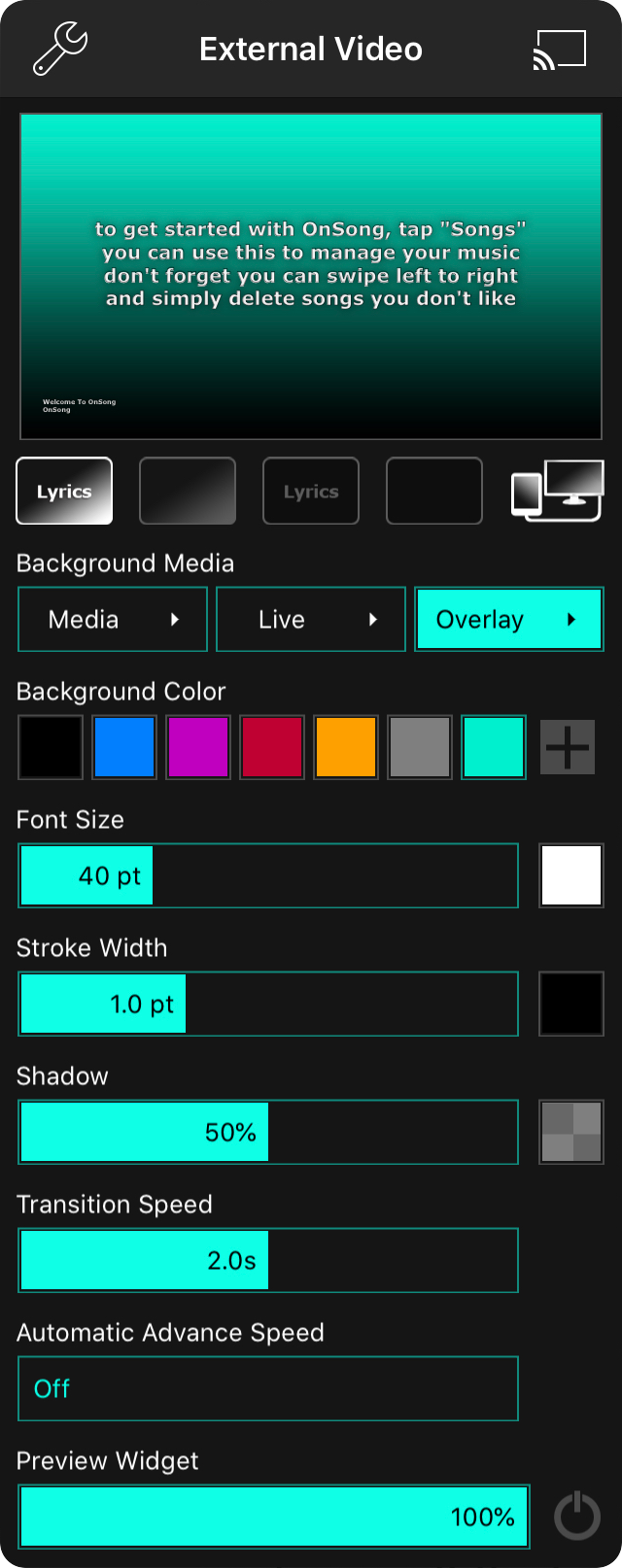
The external video menu is totally here to let you set up Lyriken-Projektion or flip into Bühnen-Monitor in OnSong. The menu's got all the doodads you need:
Einstellungen
Tap the wrench thingy in the upper-left to dive into External Video Settings straight from this menu. Riveting stuff.
Chromecast
Upper-right corner's got an icon that lets you hook up one or a bajillion Chromecast devices for wireless lyriken blasting. Tap it to connect or ghost your Chromecasts on the network using the Chromecast Picker. You're welcome.
Vorschau
The top shows a lil' preview of what your external screen's about to see. Tap the preview to flip through lyric sections & pretend you know what you're doin'. Spoiler: it doesn't actually send anything to the external screen yet. Psych!
To actually get lyrics on the external screen, tap 'em in the song viewer. Revolutionary, we know.
Modus-Buttons
Five buttons chillin' below the preview are your magic wands for combos of lyrics + background goin' to the external screen. Plus OnSong can go full stage-monitor mode with button number five if you're feeling fancy.
- Lyriken & Hintergrund throws lyrics on a color, gradient, image, or video. The whole package.
- Nur Hintergrund yeets the lyrics & keeps the background—color, gradient, image, video, whatever.
- Nur Lyriken nukes the background & leaves you with naked lyrics on the screen.
- Abdunkelungsmodus kills everything—just black. Spooky.
- Bühnen-Monitor-Modus cranks on Stage Monitor Mode by itself, totally independent of lyriken projection. It auto-activates on video devices physically tethered to your iOS device via an adapter or wirelessly via AirPlay like AppleTV. Sneaky. This way you can keep tweaking lyriken settings for other wireless stuff like Chromecast without messin' things up.
Hintergrundfarbe
Pick a background color here if you're into that sorta thing. We got black, blue, purple, red, goldenrod & grey for the basic crowd. But if you're feelin' spicy, use the Color Picker to add custom colors & tweak the swatches. Go wild.
Hintergrund-Medienpicker
OnSong can also display images & even motion videos behind your lyrics (fancy, right?). Tap the icon next to the color swatches to open the Background Media Picker. Or tap & hold it to open the picker without ditchin' your current background image or video. Strategy.
Overlay-Umschalter
An overlay can sit on top of your background—color, image, or video—& it defaults to a gradient that fades to black at the bottom. Makes the lyrics easier to read on chaos backgrounds. Helpful!
Tap & hold this button to open the Overlay Picker & pick a different overlay style & color combo.
Schriftgröße
Adjust the font size between 24 & 84 points with the slider. Default's 40. If you enable Adjust Lyrics To Fit in Lyrics Projection Settings, the font size gets capped so lines don't wrap everywhere & look like a mess.
On the right is a Color Picker so you can change the text color. Default's white because of course it is.
Strich-Breite
The stroke is basically a border around each letter. White text with an outline so it stands out from whatever's behind it. Slide it between 0 & 3 points. Default's 1.
On the right is a Color Picker for the stroke color. Default's black. Groundbreaking, we know.
Schatten
A blurry shadow behind the lyrics helps 'em pop off the background. The slider adjusts the shadow radius from 0% to 100% relative to font size. Default's 50%.
On the right is a Color Picker to pick the shadow color. Default's 50% see-through black.
Transitions-Geschwindigkeit
How fast do lyrics & background switch? That's this. Set it between 0 & 4 seconds. Default's 2.0. Super fast transitions might lag on the external screen, especially on boomer hardware or wireless stuff.
Automatische Weiterschalt-Geschwindigkeit
Cycles through slides in a song after waitin' around. Turned off by default (chill vibes). Set each slide to show for 1 to 60 seconds. Customize away.
Vorschau-Widget
This lil' control lets you enable a widget in the song viewer to preview lyriken projection & jump between sections. Tap the power icon to toggle it on/off & use the slider to mess with opacity.
Sliders can be tapped & dragged anywhere to adjust. Tap left or right to fine-tune like you're defusing a bomb.
OnSong 1.999 — Last Refreshed December 2, 2018


